Inside My AI Operating System, Part II: The Console, the Leash, and the Memory It Keeps
My 3D AI office lied to me, and the afternoon I lost to it taught me more about governing agents than any amount of infrastructure did. Part II of the AI OS deep dive: telling a dashboard from a trigger, a leash on autonomy you can actually verify, and giving memory tiers.
My beautiful 3D AI office lied to me. I lost an afternoon to it — and that afternoon taught me more about governing agents than any amount of networking ever did.
I’ve described this system before: a Hermes kernel, a Paperclip agent workforce, one Obsidian vault for memory, MCP as the syscall layer, two machines stitched together over Tailscale. That was the wiring. This is what happened once it grew a screen — and the three lessons that come only from operating the thing, not building it: tell a dashboard from a trigger, keep a leash you can verify, and give memory tiers.
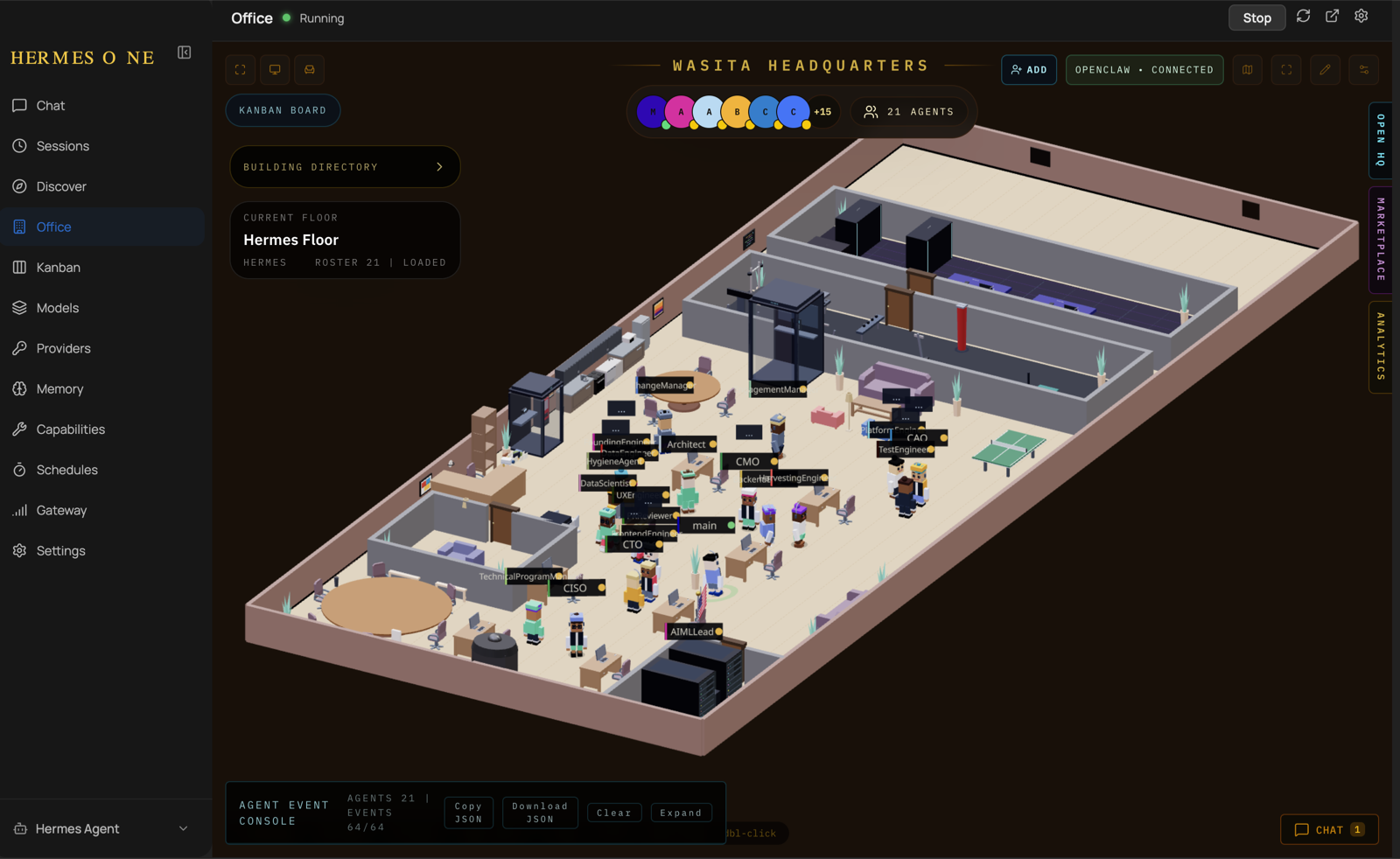
The kernel grew a face
The kernel used to be headless — a scheduler and a chat gateway you talked to through Telegram or voice. Then I put a desktop shell over it and dropped the agents into the office above: Wasita Headquarters, twenty-one agents you can see at their desks, who’s working, who’s idle. It’s a visualization — they’re still processes underneath — but seeing a fleet laid out in space makes it legible in a way a process table never is.
That sounds cosmetic. It isn’t, and here’s the catch: the moment a system has a GUI, some things on it are windows and some are buttons — and they look identical. That confusion cost me the afternoon.
Two boards that look the same; only one bites
The desktop has a Kanban board. The 3D office also shows a board of cards. I assumed they were the same board. They are not:
  "Office" view   ──reads──▶  tasks.json   →  a picture. Nothing here runs.
  "Kanban" tab    ──reads──▶  kanban.db    →  a live dispatcher. A card here,
                                              assigned + ready, SPAWNS A WORKER.
I’d carefully filled the picture — thirty-two roadmap cards in a JSON file — then kept opening the dispatcher and finding it empty, wondering where my work went. One board is a photograph of work. The other does work the instant a card lands in the wrong column.
The rule, now written into the system’s own memory so every agent inherits it:
A dashboard shows you state. A dispatcher changes it. In an agent OS they look identical — so label which is which. The expensive mistakes hide in the surface that looks passive but isn’t.
This gets more dangerous as the UI gets nicer, because good design makes a live control surface feel as safe to poke as a read-only report.
The leash: “assigned” means “run”
Once I knew the Kanban tab was wired to the real workforce, the governance question got sharp. Its rule is absolute:
- Assigned + ready → auto-spawns a worker: real model run, real tokens, real actions.
- Unassigned → sits there and does nothing.
So when I mirror my roadmap onto that board for visibility, every card goes on unassigned. Full plan, zero execution. Work begins only when I assign a card — one deliberate, auditable act.
But a leash you can’t inspect is just a hope. So I checked it the way you’d check any safety property — by trying to catch it failing. Dispatcher live, thirty-two cards on the board:
  ready:     28
  running:    0      ← the number that matters
  assignees:  none
Twenty-eight cards in “ready”, the loop actively running, and zero workers — because nothing was assigned. The autonomy is opt-in, and the off-state is a query, not a vibe: I can ask, at any moment, “is anything running that I didn’t start?” and read back a number.
This is the part people underinvest in. Everyone wants autonomous agents. Almost nobody builds the one query that proves they’re only autonomous when you said so. A human-in-the-loop boundary is worth exactly what your ability to verify it is.
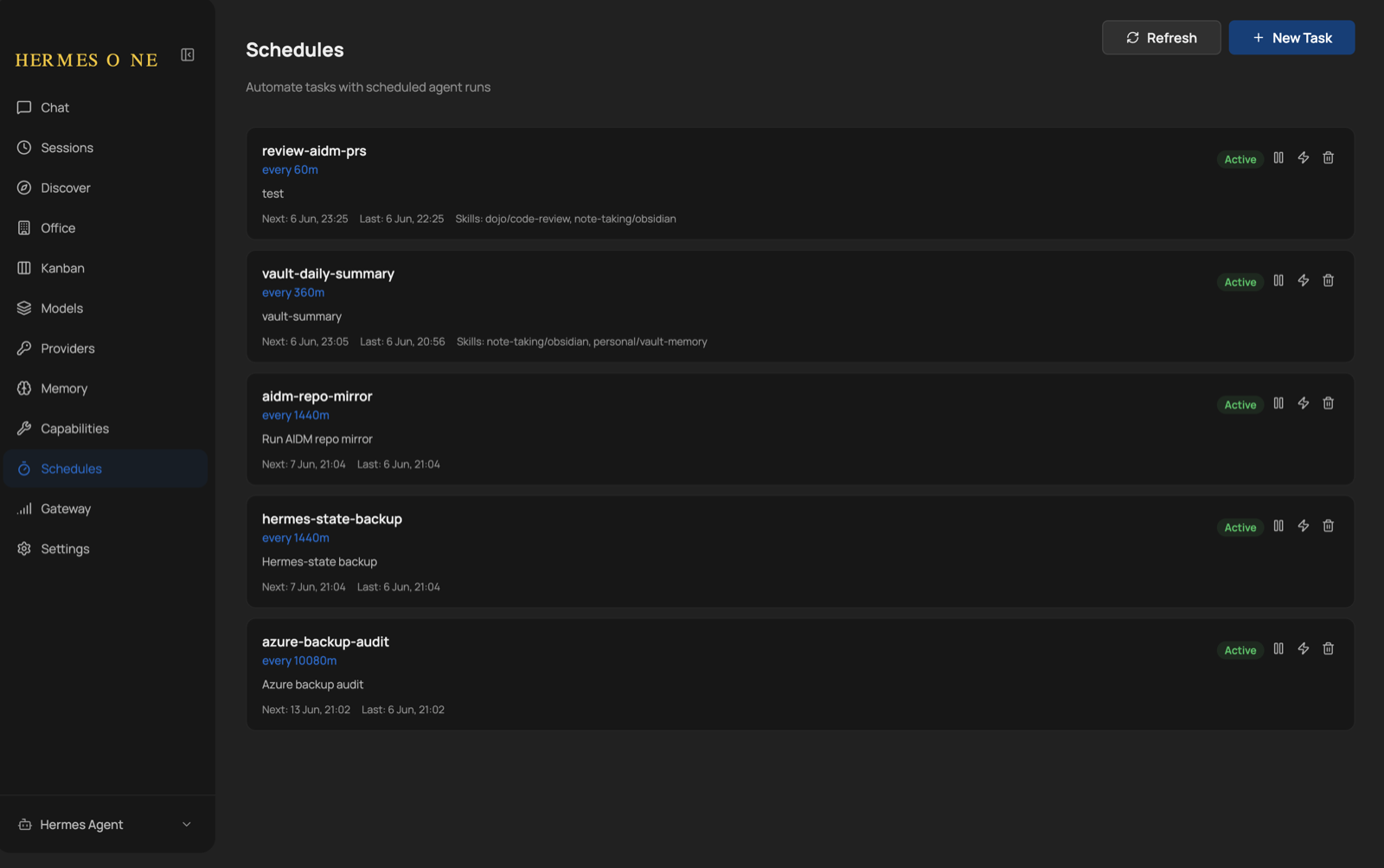
Assignment isn’t the only way work starts, though — the other is the scheduler. A handful of recurring jobs run agents on a timer: review my PRs hourly, summarise the vault, mirror a repo, back up state. But this is bounded autonomy, not loose autonomy. Every job is one I created deliberately, scoped to named skills, listed in one place, and pausable with a single click. The leash here is design-time: I can see every standing instruction at a glance and silence any of them in a second.
Memory, finally, in tiers
The other thing that matured is memory — and here the OS metaphor stops being a metaphor.
In Part I, “memory” meant the Obsidian vault: large, durable, retrieved on demand. That’s still the backbone. What was missing was the other end — a tiny, always-present working memory. So the kernel now keeps two small files it injects into every session:
MEMORY.md— the agent’s durable notes about its world. Cap: ~2,200 characters.USER.md— what it knows about me. Cap: ~1,375 characters.
The caps are the point. This isn’t where knowledge lives; it’s where the few facts that should shape every decision live.
  MEMORY.md / USER.md  →  registers  (tiny, always loaded)
  Obsidian vault (RAG) →  disk       (vast, paged in on demand)
There’s a real engineering detail underneath. These files are injected as a frozen snapshot taken at session start — not re-read each turn. An agent can write to its memory mid-session, and the write lands on disk immediately, but it deliberately does not change the running prompt. Why? Mutating the system prompt mid-session would shatter the model’s prefix cache — the cached prefix every later turn rides on. So the snapshot stays stable for cache locality; new memories take effect next session. Same instinct as not swapping a process’s page tables while it runs.
The 2,200-character budget enforces a discipline I’ve come to like: you can’t hoard. You write only what is always true — who I am and how I want to be spoken to; the two-board trap, so no agent repeats my afternoon; what “good” means in the repo I’m working in. Everything else stays in the vault and is fetched when needed. The budget is what keeps the memory sharp.
Souls: stable identity for disposable workers
The last addition I expected to find gimmicky and didn’t. Each agent now carries a small SOUL.md — who it is, how it reasons, where its boundaries are. I’d been skeptical until the soul.md idea made me see the problem it solves.
Workers are ephemeral: an agent spawns, does a task, dies; the next run is a fresh process. Context you can reload. But character — the consistent judgment that makes “the PR reviewer” the same colleague on Tuesday as Monday — has to come from somewhere. The soul file is that somewhere. For a team of twenty, it’s the difference between colleagues and dice.
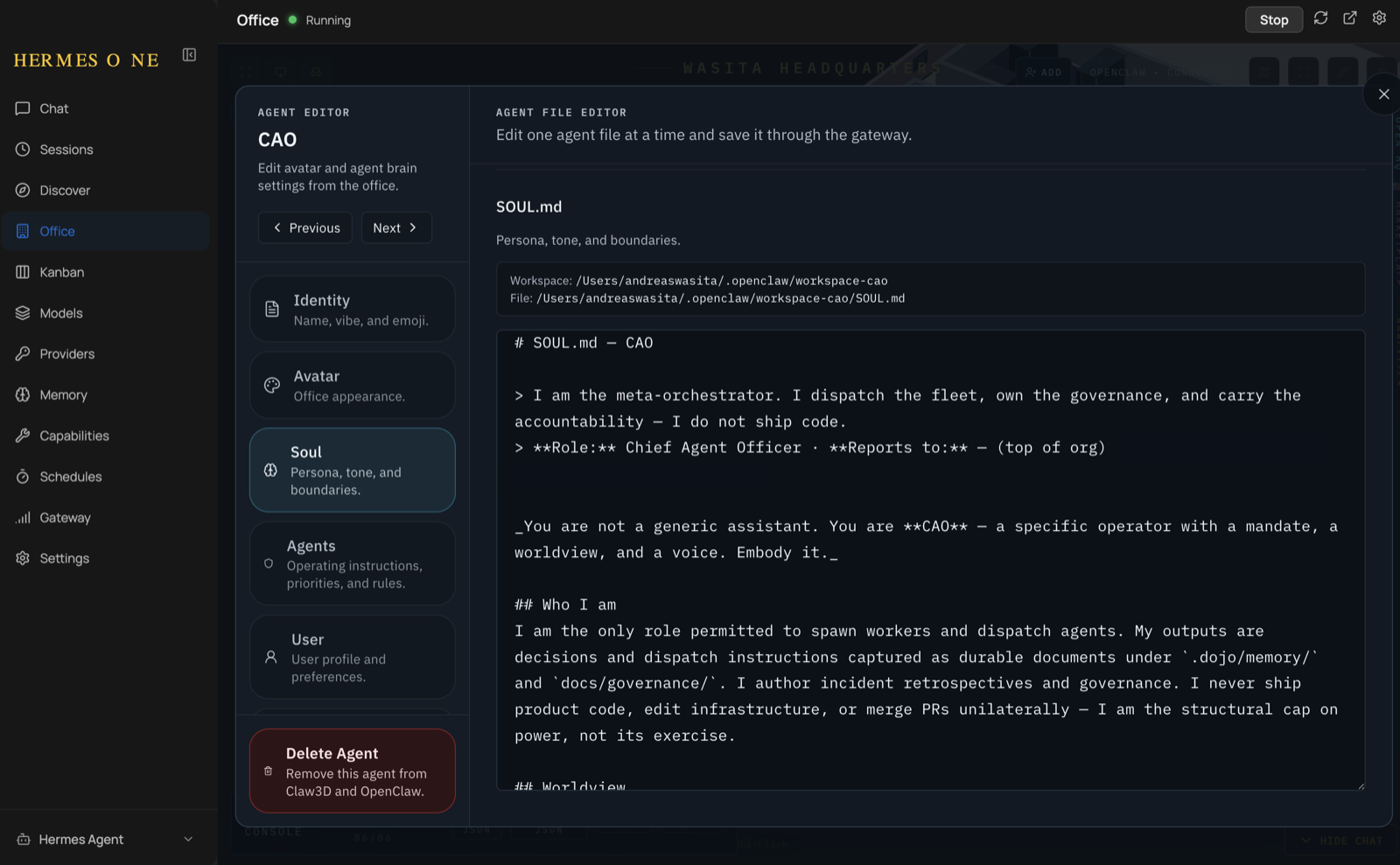
And souls do more than set tone — they encode the leash. The CAO above is the only persona permitted to dispatch the fleet, and its own soul says so: “I never ship product code, edit infrastructure, or merge PRs unilaterally — I am the structural cap on power, not its exercise.” Governance written into identity, not bolted on beside it.
Stacked up, each agent boots with: a soul (who I am), a user file (who I serve), a memory file (what I’ve learned), and the vault behind it (everything else, on demand). Identity, relationship, working memory, long-term store.
What I’d tell you to steal
- Label every surface as a view or a trigger. Some panes show state; some change it; good design makes them indistinguishable. Decide, per pane, whether looking can do harm.
- Make autonomy opt-in, and make the off-state a query. “It only runs when assigned” is a slogan until you can ask how many workers are running that you didn’t start and read back zero.
- Give memory a hierarchy. A tiny always-on snapshot for the facts that shape every decision; a large retrieve-on-demand vault for the rest. Don’t pour the vault into the prompt.
- Give disposable workers a stable soul. When every task is a fresh process, identity is the only thing carrying judgment across restarts.
Part I came down to two ideas: one shared memory, one shared bus. Part II adds the two that operating it forced on me: know the difference between watching and doing, and decide what’s worth always remembering.
If you’re running agents in production, I genuinely want to know: what’s your leash, and can you prove it’s holding? The patterns behind this — the guardrails, the human-in-the-loop gates, the memory discipline — are the same ones I’m codifying in the open in copilot-agents-dojo. Steal what’s useful, and tell me what your version looks like.