GitHub Copilot Fusion: What It Does, What It Costs, and When I'd Use It
Copilot Fusion picks the models for each prompt and can send a draft to a judge or a panel of critics. How it works, the effort levels and plans, honest pros and cons, and a one-week test for your own repo. Every claim checked against GitHub's docs.
GitHub made Copilot Fusion generally available on 28 October 2026. It changes the first thing you do in Copilot’s model picker. Instead of choosing a model, you choose Fusion and an effort level, and Copilot decides which models handle each prompt, sometimes more than one.
This is a documentation-based guide, not a hands-on benchmark. The task recommendations below are how I’d evaluate Fusion, not results from a completed trial.
This post is built on GitHub’s documentation and changelog, two independent write-ups, and the X posts about Fusion with the most engagement since launch. It covers what Fusion is, how it works, what it costs, the pros and cons, and how I’d test it on one repo before making it my default. By the end you’ll know which effort level to start on, what drives the bill, and the one limit that should change how you review its work.
What Copilot Fusion is, in one minute
GitHub’s docs describe it as “an intelligent runtime model router and orchestrator.” In plain words, when you select Copilot Fusion in the model picker you aren’t selecting a model. You’re selecting a system that chooses the models for you, prompt by prompt, and gives you back one response.
Fusion combines two things GitHub already had: the multi-model orchestration from Project HydraFusion and Copilot’s auto model selection. If you used Auto, HydraFusion or HydraFusion Max during the research preview, your selection moves over to the matching Fusion effort level automatically.
It’s generally available in Visual Studio Code, Copilot CLI, the GitHub Copilot app and JetBrains IDEs.
How it works
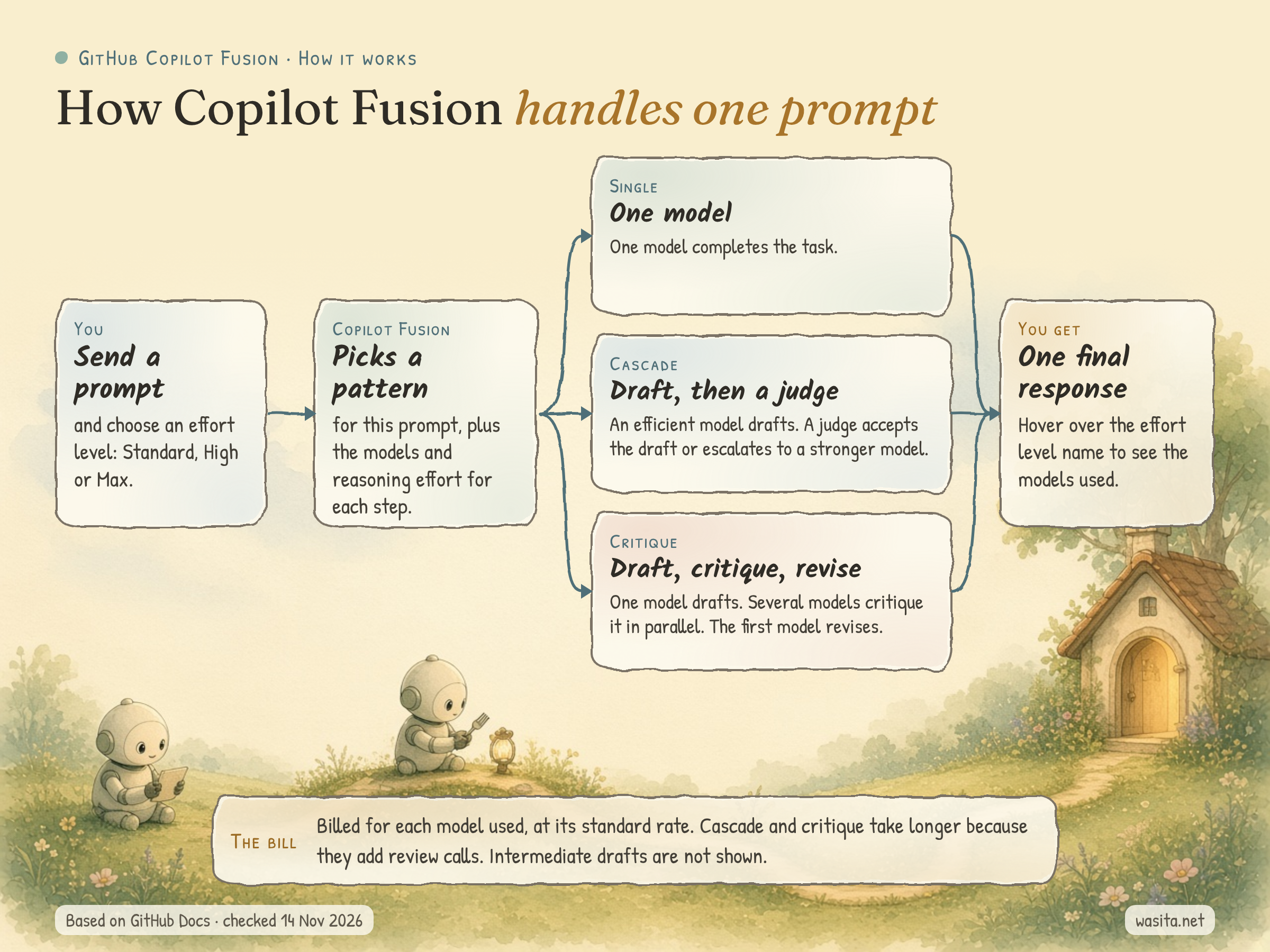
For every prompt, Fusion looks at the task and picks one of three execution patterns:
| Pattern | What happens |
|---|---|
| Single | One model completes the task. |
| Cascade | An efficient model drafts a solution. A judge inspects the draft and either accepts it or escalates to a stronger model. |
| Critique | One model drafts a response while several other models critique it in parallel. Their feedback is combined, and the original model revises its response. |
A few details from the docs change how I’d use it:
- It decides per prompt. One session can use Single for your first question and Critique for the follow-up. GitHub says choosing the pattern adds minimal latency.
- It only adds model calls when the task needs them. A simple prompt runs on one model and behaves like a normal request. Cascade and Critique take longer, because they include review calls.
- You can see what it did. While it works you can follow each step and the model running it. After the response, hover over the effort level name below it to see the list of models used. Intermediate drafts can be revised or thrown away, so you only see the final response.
- It has no context window of its own. Each step runs inside the limits of the model running it. The context window Fusion shows is a conservative number, based on the smallest limit among its models.
- It doesn’t start subagents. Fusion works separately from subagents and never starts one itself.
One note if you read my OpenChamber 101 guide. OpenChamber also has a feature called Fusion, and it’s a different thing. In OpenChamber you run one prompt on several models you chose yourself, then Fusion combines the results. Copilot Fusion makes the model choice for you inside a single Copilot request, and decides whether a second model is needed at all.
The effort levels, and who gets them
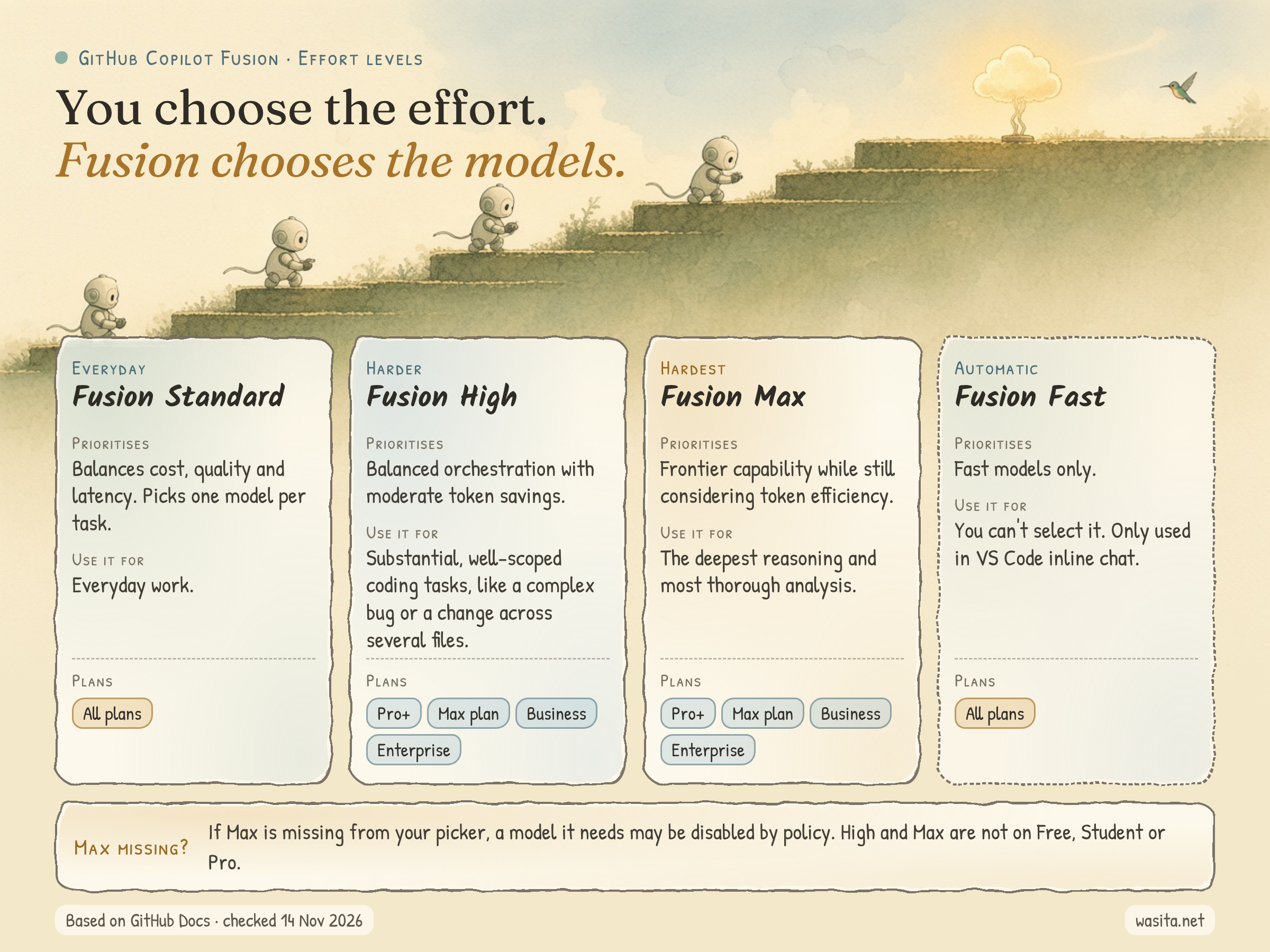
You choose the effort level. Fusion chooses everything else, including the reasoning effort for each step.
| Effort level | What GitHub says it prioritises | Typical use | Plans |
|---|---|---|---|
| Fusion Standard | Balances cost, quality and latency | Everyday work. Fusion picks one model for each task. | All plans |
| Fusion High | Balanced orchestration with moderate token savings | Substantial, well-scoped coding tasks, like fixing a complex bug or a change across several files | Pro+, Max plan, Business, Enterprise |
| Fusion Max | Frontier capability while still considering token efficiency | Tasks that need the deepest reasoning and most thorough analysis | Pro+, Max plan, Business, Enterprise |
| Fusion Fast | Fast models only | Not selectable. Only used in VS Code inline chat. | All plans |
Two things worth knowing before you plan around this:
- You’ll read in a few places that Fusion is on “all Copilot plans.” That’s true for Standard. High and Max are included on Copilot Pro+, Copilot Max, Copilot Business and Copilot Enterprise, and not on Copilot Free, Student or Pro, according to the plan table in the docs.
- Fusion only uses models your plan and your admin policies allow, including data-residency, FedRAMP and Evaluation-model policies. If Max doesn’t show up on a plan that includes it, one of the models Max needs may be disabled. One person on X said they couldn’t see Max at work; that’s the first thing I’d check.
There’s also a public preview where Fusion Standard can use a model you’ve installed locally (MAI Code 1.1 Flash on Windows, or Qwen3.8 Flash Next in Copilot CLI). It needs experimental features turned on, so I’d treat it as something to try later, not part of a first setup.
What it costs
There’s no separate charge for Fusion. GitHub bills you for each model Fusion uses, at that model’s standard rate. Because High and Max can use more than one model for a task, a task on those levels can cost more AI credits than it would on Standard. Through 30 November 2026, paid Copilot plans get a 30% discount on model costs when using Fusion.
Two cost details in the docs are easy to miss. Fusion keeps your main conversation on the same model whenever it can, so you keep the benefit of cached tokens, and helper models such as a reviewer only get the context they need. It also only switches models at natural cache boundaries or when the conversation gets much harder, to avoid paying extra cache costs for no quality gain.
The number most launch posts quoted comes from Artificial Analysis. They ran Fusion’s Max setting in Copilot CLI on their Coding Agent Index v2.0:
| Fusion Max (Copilot CLI) | Claude Code with Opus 5.5 (max) | |
|---|---|---|
| Coding Agent Index score | 60 | About 2 points higher |
| Average API cost per task | $5.59 | $11.42 |
| Tokens per task | 7.2M | About twice as many |
GitHub’s changelog adds that Fusion Max took about 40% less time per task than Claude Code. The breakdown is less tidy than the headline. Fusion led Terminal-Bench 4.0 with 71, but came third on FrontierCode with 51, behind Claude Code with Opus 5.5 (56) and Devin Fusion (54).
I’d read that carefully. It’s one index, it covers Max only, and it measures API cost per task, not what your Copilot plan will charge you. A reply on X put it well: “Copilot Fusion increases cost efficiency, not necessarily total cost” (@awakecoding).
What people are saying on X
Sorted by likes and views, X posts about Copilot Fusion since launch have one clear standout, the Artificial Analysis benchmark post, with 602 likes and about 131,000 views as of 14 November. Nothing else passed 30 likes. Most of the rest of the conversation is in replies, and it falls into four groups.
- Skeptics. The most-liked opinion post in the search was negative: “Copilot Fusion makes no sense. The value is it’s slightly cheaper.” (@ibuildthecloud). The argument is that cheaper open-weight models will matter more than routing.
- People who like it, with caveats. “I love Copilot Fusion, it’s extremely efficient. I just find it a bit slow sometimes” (@awakecoding).
- Budget complaints. One long post said Copilot “burns through its AI credits far too quickly compared with Codex” and asked GitHub to pass Fusion’s efficiency gains on as more included usage (@SigmaRayTive).
- Questions. Several replies asked for independent evaluations, how much of the saving turns into merge-ready code, and whether you can see which model handled each step. The last one has an answer: hover over the effort level name under the response.
None of these are facts about Fusion. They’re a good list of what to measure when you test it yourself.
Pros and cons

Pros
- One less decision. You pick how much effort a task deserves, and Fusion picks the models. You also don’t have to remember to switch back to a cheaper model after a hard task.
- You don’t pay for review you don’t need. A simple prompt runs on one model. Fusion only adds model calls when the task warrants them.
- A second opinion on hard work, without wiring it up. Cascade puts a judge on the draft, and Critique gets several models to review it in parallel. Doing that yourself means running and comparing several models by hand.
- A strong benchmark result. On the Artificial Analysis Coding Agent Index, Fusion Max came within two points of Claude Code with Opus 5.5 at about half the average API cost per task.
- Admin control. Admins decide which models Fusion can use, can disable a model for Fusion without disabling it for everyone, and can set Fusion at any effort level as the default for their users.
- You can check its work. You can follow each step while it runs and see the models used afterwards.
Cons
- The cost per task varies. You pay for every model it uses, and High and Max can use several. People on X are already saying their credits run out fast. The 30% discount ends on 30 November.
- Harder patterns are slower. Cascade and Critique include extra review calls, so they take longer than a single model.
- Less control and less repeatability. You don’t choose the model, and GitHub says the model pool and patterns change over time. That’s a problem if you need the same model every run, for a comparison or an approved workflow.
- Thrown-away drafts can leave edits behind. If Fusion discards a draft, file edits that draft already made aren’t undone automatically. You have to review the diff.
- High and Max aren’t on every plan. They aren’t included on Free, Student or Pro, and Max can disappear from the picker if a model it needs is disabled.
- The benchmark is narrow. It covers Max only, on one index, measured in API cost. Fusion also came third on FrontierCode.
When it’s worth using
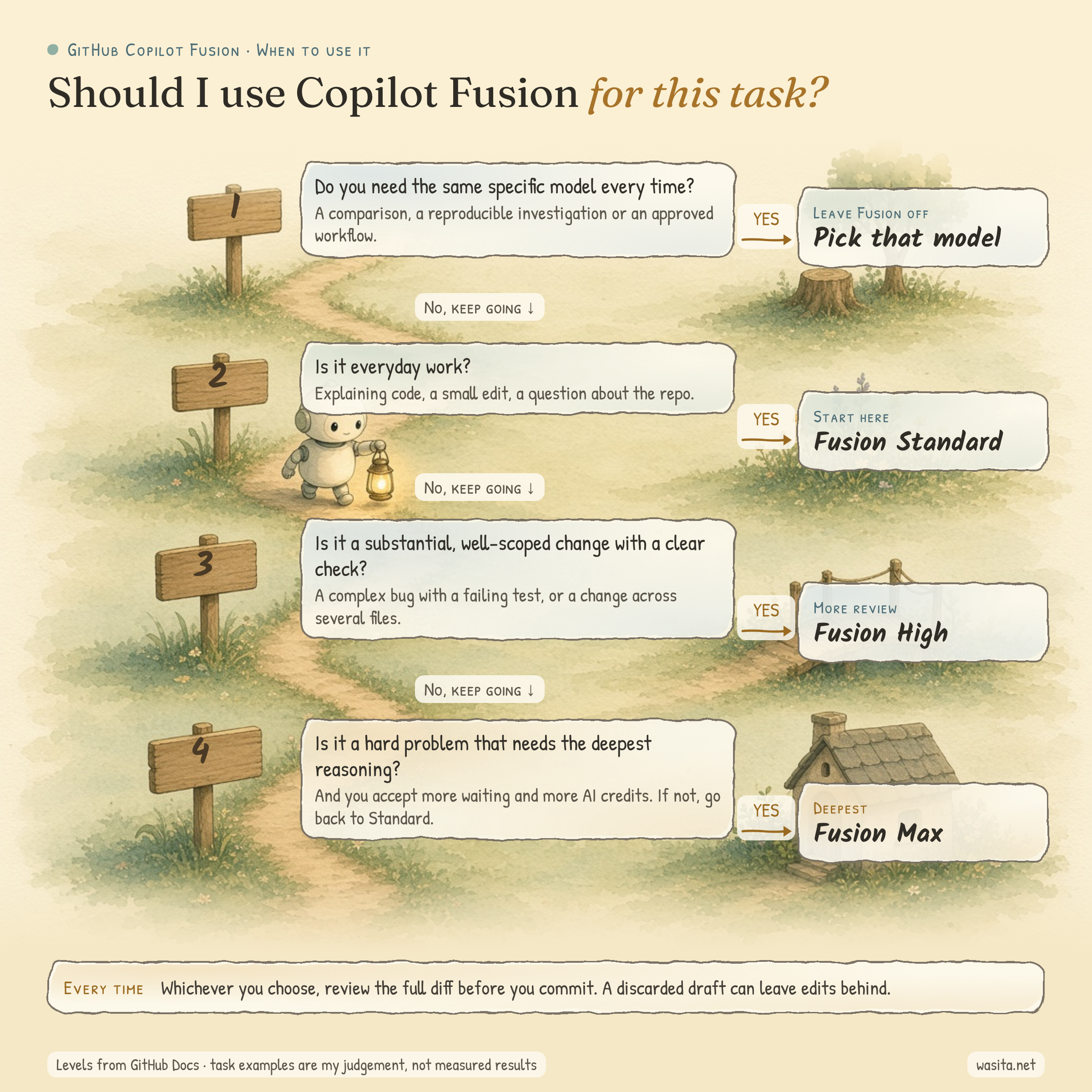
This is how I’d decide, task by task. The levels follow GitHub’s own descriptions; which task goes where is my judgement, not a measured result.
- Leave Fusion off when you need the same model every time. That covers comparing tools, reproducing a bug investigation, or any workflow where someone approved a specific model.
- Fusion Standard for everyday work: explaining unfamiliar code, small edits, questions about the repo.
- Fusion High for a substantial change you can check, such as a bug with a failing test or a change across several files. The extra review has something specific to look for.
- Fusion Max for the hardest problems, when deeper reasoning is worth more waiting and more credits. A vague request like “improve the whole app” is a bad use of Max, because you can’t tell whether the extra effort helped.
How I’d start: one repo, one week
This is adapted from the one-repository trial in Omid Saffari’s write-up.
- Update your client and turn it on. Open the model picker, select Copilot Fusion, and choose Standard.
- Pick three tasks you can check. A small edit, a bug that spans several files and has a failing test, and a bounded refactor. Write the acceptance check for each one before you start, and branch each from the same commit.
- Run your usual model and Fusion Standard on the same tasks. Only try High on a task where the Standard result shows a specific need for more review.
- Write down what happened. After each response, hover over the effort level name and note the models used. Record how long it took, how many follow-up prompts you needed to fix it, and whether you accepted the change.
- Count the whole attempt. Include failed runs and retries when you add up AI credits. A cheap answer that needs three fixes can cost more than one good answer.
- Review the full diff before you commit. Run
git statusandgit diffand read every changed file, because a discarded draft may have left edits behind. - Decide on credits per accepted change. Keep Fusion as your default where it gets you acceptable work with less fixing. If you test by 30 November, remember the 30% discount is in your numbers and won’t be after that.
The takeaway
Fusion takes one decision, which model to use, away from you and makes it per prompt. I’d let it make that call on Standard for everyday work, use High when a task has a clear check, and keep picking a model myself when I need the same one every run. Whichever level I’d pick, I’d still read the full diff before committing.
Which tasks would you let Copilot pick the model for, and which would you still choose yourself?
Sources: About GitHub Copilot Fusion (GitHub Docs) · GitHub Changelog, 28 Oct 2026 · Artificial Analysis on X · Omid Saffari: GitHub Copilot Fusion · CellCog: GitHub Copilot Fusion. Checked on 14 November 2026.