Four Folders Won't Hold: Configuring Obsidian as Memory for Your AI
PARA gets you started, then it breaks. Six months in, your weekend vault is a junk drawer and your agent can't find anything in it. Here's how I reshaped Tiago Forte's four folders into deterministic memory categories an AI can actually ground on — frontmatter contracts, progressive summarisation written for a machine, and the weekly loop that keeps a second brain honest.
A fortnight ago I told you to build a grounding brain in an afternoon: five folders, one habit, point your agent at the vault. Projects, Areas, Resources, Archive — Tiago Forte’s PARA — plus a Sources/ folder for provenance.
That advice is correct. It’s also where most people stop, and it’s exactly where the trouble starts.
Because here’s what nobody tells you about a weekend vault: you use it for six months and it breaks. Not dramatically. Quietly. Resources/ swells into a landfill of half-read clippings. You open a note titled “API stuff” and have no idea which API, from when, or whether you ever finished the thought. Your agent searches the vault and pulls back three contradictory notes with equal confidence — and now you’re back to the confident stranger with opinions the whole exercise was meant to kill.
The folders held your files. They didn’t hold your memory. There’s a difference, and an AI second brain lives entirely in that gap.
This is the follow-up I promised — the personal-knowledge side of loop engineering. It’s the deep end. If you haven’t built the weekend vault yet, start there and come back. If you have, and it’s already starting to sag, this is the post that tells you why and what to do about it.
Is PARA actually true?
Let’s give Forte his due, because the criticism that follows is the friendly kind.
PARA is genuinely good. It comes from Building a Second Brain, and its core move is the one most note systems get wrong: organise by actionability, not by topic. A note about Kubernetes doesn’t live in a “Kubernetes” folder — it lives in the project it serves, or the area it maintains, or the resources you might use it for, sorted by how soon you’ll act on it. That insight alone rescues thousands of vaults from topic-folder paralysis, where you spend more time deciding where a note goes than writing it.
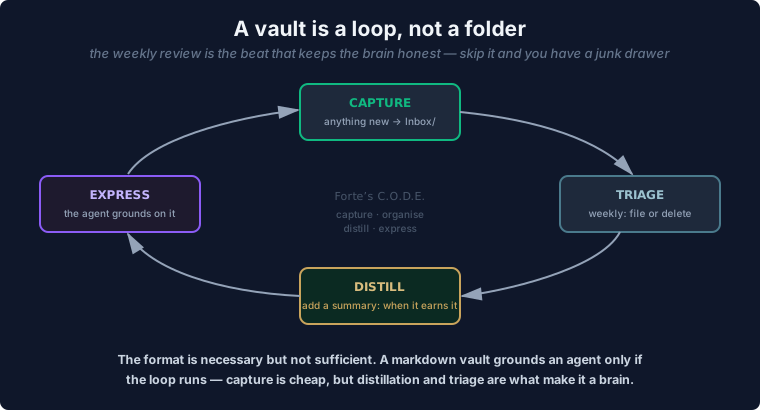
Forte’s wider engine is CODE — Capture, Organise, Distill, Express. Capture what resonates, organise it by actionability with PARA, distill it down to the essence, and express it as something you make. “Your second brain is a factory, not a warehouse,” he writes, and that line is the whole philosophy in eight words. A second brain you only fill is a hoard. One you draw from is a tool.
So yes: PARA is true. As a system for a human deciding what to do next, it’s excellent, and I still use its spine every day.
But “is it true?” was never quite the question. The real question is the one you asked when you pointed an AI at it: is PARA enough to be memory for a machine? And the honest answer is no — not as four folders, not unchanged.
Where PARA breaks for an AI
Three cracks, and they all widen the moment a non-human starts reading the vault.
Folders fight Obsidian’s grain. Obsidian’s whole philosophy is link-first — knowledge as a graph of connected notes, not a tree of nested folders. Forte himself has written about this tension; he calls pure tagging “too fragile” and pure folders “notebook-first”, and reaches for a “note-first” synthesis. A strict PARA hierarchy quietly works against the one thing Obsidian does better than a filesystem: the [[wikilink]]. When you optimise for which folder, you stop optimising for which connection — and connections are what an agent traverses to reason.
Areas and Resources are ambiguous — and ambiguity is poison to a machine. Is “Prompt engineering” an Area you maintain or a Resource you reference? For you, the answer is “who cares, I’ll find it.” For an agent running a deterministic query, that shrug is a bug. The two squishiest folders in PARA are precisely the ones an AI can’t disambiguate, so it either over-fetches (pulls both, contradicts itself) or under-fetches (misses the note that mattered). A human tolerates fuzzy categories. A retrieval system punishes them.
Agents need memory categories with lifetimes, not actionability buckets. This is the deep one. A human organises by “what do I act on next.” An agent needs to know something a PARA folder never encodes: how long is this true, and how much do I trust it? A daily log is true for a day. A decision is true forever. A piece of reference knowledge ages slowly; a project status ages by the hour. PARA flattens all of that into “how actionable”, which is the wrong axis for a thing whose job is to remember at the right confidence for the right duration.
None of this means throw PARA out. It means reshape it — keep the spine, replace the squishy middle.
The reshape: from four folders to a memory model
Here’s the move. Projects and Archive survive almost untouched — they’re already crisp. Areas and Resources, the ambiguous pair, dissolve into something an agent can address deterministically: a set of named memory categories, each with a declared lifetime.
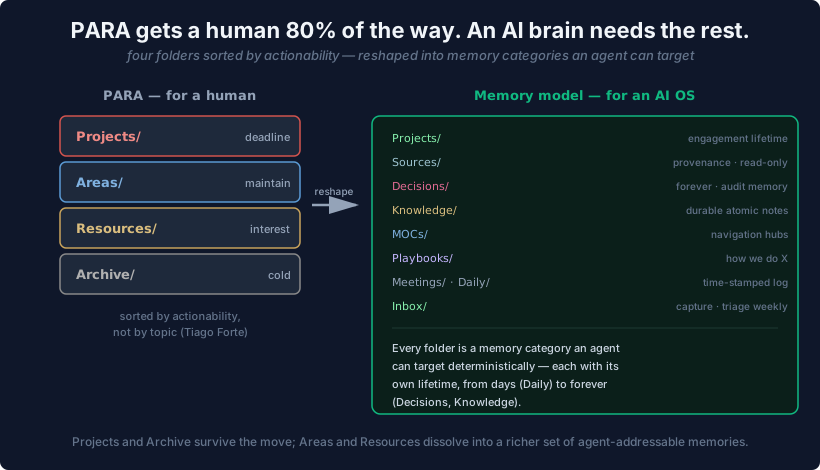
This is the actual top level of the vault I share across every agent on my machine — Hermes, Paperclip, and my Copilot CLI all read the same tree:
Inbox/— the unsorted capture point. Lifetime: until the next triage. Nothing lives here.Sources/— read-only provenance. The originals you cite. Lifetime: permanent, never edited.Projects/— active, time-bound work. Lifetime: until the project ships, then it moves to Archive.Decisions/— one note per real decision: what, when, why. Lifetime: forever. This is the audit ledger.Knowledge/— distilled, durable understanding. Lifetime: long; ages slowly.Daily/— the running log. Lifetime: days. Useful now, noise in a month.MOCs/— maps of content, the hand-built index notes that link the graph together.Meetings/,Playbooks/,Templates/,Archive/— the supporting cast, each with its own clear job.
The point isn’t my exact eleven folders. The point is the principle: every folder is a memory category an agent can reason about, and every category carries an implicit answer to “how long is this true.” That’s the thing PARA’s four buckets can’t tell a machine, and it’s the thing that stops your agent treating a throwaway daily note as gospel.
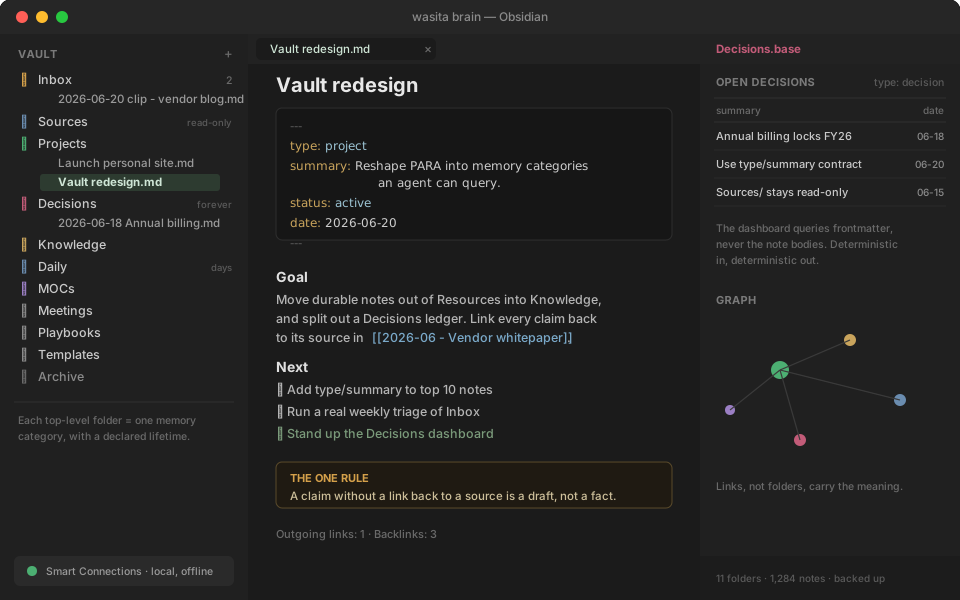
Here’s what that looks like in practice — the vault on the left, a note carrying its frontmatter contract in the middle, and a frontmatter-driven dashboard on the right:
The contract that makes a folder queryable
Folders give an agent a coarse filter. To go from “search a folder” to “answer reliably”, you need one more thing, and it’s the highest-leverage habit in the whole setup: a frontmatter contract.
Every note opens with a small block of YAML. Two fields do the heavy lifting.
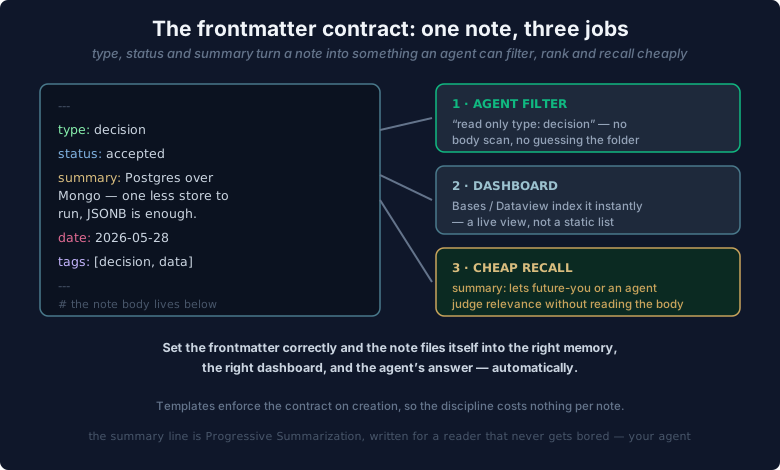
---
type: decision
summary: Chose annual billing to lock the FY26 rate before the July increase.
date: 2026-06-18
status: final
---
type: is the deterministic category — decision, permanent, literature, playbook, moc, daily, project. It’s the unambiguous handle that fixes the Areas-versus-Resources problem: the agent never guesses what a note is, because the note declares it. Query type: decision and you get every decision, no false positives, no folder archaeology.
summary: is a single line, in your own words, of what the note actually says. I call it the cheap-recall contract, and it’s the most important field you’ll write. It’s a direct descendant of Forte’s progressive summarisation — and it’s what lets an agent skim a thousand notes by reading one line each, dropping into the full body only when the summary earns a closer look. Notes without a summary: are invisible to fast recall. The field is the index.
This is also what makes the vault queryable instead of grep-able. With a frontmatter contract, I can point an Obsidian Base or a Dataview query at the structure — “every open decision”, “every permanent note touched this month” — and get a deterministic table back. The agent reads that table, not a fuzzy full-text scrape. My three dashboards (Decisions, Projects, Knowledge) query frontmatter and never the note bodies. Structured beats statistical every time you can afford it.
Progressive summarisation, written for a machine
Forte’s progressive summarisation is a layered technique: L0 is the source, L1 your captured note, L2 the bold passages, L3 the highlighted best-of-bold, L4 a one-line summary in your own words. Each layer is a smaller, faster door into the same note.
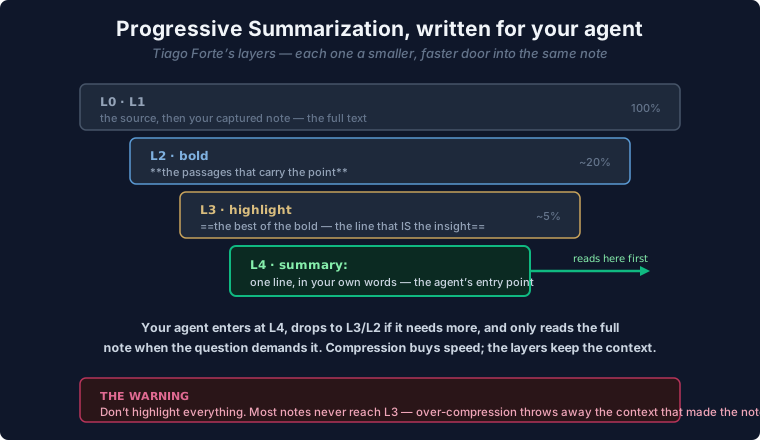
For a human, the payoff is review speed. For an agent, it’s the entire retrieval strategy. The agent enters at L4 — your summary: line — and only descends to the bold passages or the full body when the question demands it. The core tension Forte names is discoverability versus understanding: compress too little and recall is slow; compress too much and you’ve thrown away the context that made the note worth keeping.
That tension is also the trap. Forte’s own warning is the one to tattoo on your wrist: don’t summarise everything, and don’t highlight everything. Many notes never need a single bold word. An over-highlighted vault is as useless as an un-highlighted one — when everything is emphasised, nothing is, and your agent inherits a note where every line claims to be the point. Summarise on demand, not on capture. Let the note prove it deserves the effort first.
The provenance lane survives — and matters more now
The Sources/ folder from the weekend setup doesn’t just survive the reshape; it becomes load-bearing.
Sources/ is read-only by convention. The originals live there — PDFs, transcripts, saved articles, the actual repos I’m working in — and nothing edits them. Your own thinking goes in Knowledge/ or Decisions/ and links back to the source with a wikilink. That link is the citation, and it’s the same grounded, governed, provenanced contract from the provenance post, now structurally enforced by the folder layout rather than just a good intention.
The one rule still holds, and it’s still the only rule that matters: a claim without a link back to a source is a draft, not a fact. Everything else in this post is optimisation. That habit is the foundation.
Wiring the agent in — local-first, the same promise
Structure done, you connect the agent. The good news is the 2026 tooling is real and most of it runs entirely on your machine.
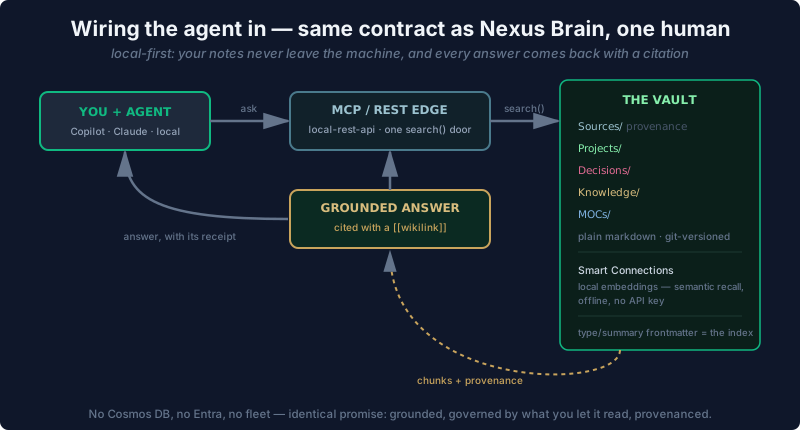
A few paths, in rough order of effort:
- Smart Connections (by brianpetro) — local embeddings, zero setup, fully offline. Semantic recall over your vault with no API key and nothing leaving the machine. This is the easiest “AI can read my notes” on-ramp that exists.
- The Local REST API (by coddingtonbear) — exposes your vault over a local endpoint and now ships a built-in MCP server, so a Claude or Copilot client can call one
search()door into your notes.claude mcp add --transport http obsidian …and you’re grounded. mcp-obsidian(by MarkusPfundstein,uvx mcp-obsidian) andobsidian-mcp-server(by cyanheads, with BM25 and Omnisearch) — fuller MCP toolsets if you want the agent to write back, not just read.- The official MCP memory server (modelcontextprotocol/servers) — a local knowledge graph in JSONL, if you want agent memory alongside the vault rather than inside it.
Whichever you pick, the shape is identical to the enterprise Nexus Brain: you ask, the edge searches, the vault returns chunks plus their provenance, and the answer comes back cited with a [[wikilink]]. No Cosmos DB, no Entra, no fleet. One human, same contract — grounded, governed by what you let it read, provenanced.
The honest caveat — format isn’t enough
Now the part the enthusiastic vault-builders skip.
A markdown vault is necessary but not sufficient for an AI second brain, and there’s real research worth respecting on the limits. Maggie Appleton’s critique of the second-brain movement is fair: much of it “isn’t based in much scientific evidence.” Andy Matuschak’s is sharper and more useful — he observes that “people who write extensively about note-writing rarely have a serious context of use”, and that effective system design has to come from one. The format doesn’t think for you. A beautifully structured vault full of shallow notes grounds an agent in shallow nonsense, very efficiently.
What actually makes a vault into memory isn’t the folders or the frontmatter — it’s the loop. Capture is cheap; everyone captures. The work is the weekly triage that empties the Inbox, the distillation that earns a summary:, the discipline of linking back to a source. Skip the loop and you don’t have a second brain. You have a junk drawer with good lighting and an AI that confidently reads you your own junk.
That loop is the personal-scale version of the overnight learning fleet and the harness I keep coming back to. The engineered system around the model is what turns a chatbot into something that does a job. The same is true one rung down: the engineered system around your notes is what turns a folder of markdown into something an agent can actually think with.
Where to start, honestly
If you’ve got the weekend vault and it’s sagging, don’t rebuild it tonight. Do three things this week:
- Add
type:andsummary:to your ten most-used notes. Watch how much faster your agent finds them. That’s the whole thesis in ten minutes. - Split the worst offender. Take your bloated
Resources/folder and pull the durable stuff into aKnowledge/category and the decisions into aDecisions/one. Two clean categories beat one ambiguous bucket. - Run one real weekly triage. Empty the Inbox. File or delete — no third option. Then notice whether the vault feels different. It will.
PARA gets you in the door. Four folders, sorted by actionability, are exactly the right thing to start with — and exactly the wrong thing to stop with. The brain that compounds isn’t the one with the cleverest folder structure. It’s the one you keep the loop running on, with enough structure that a machine can finally read it back to you and show its work.
Reshaping your own vault? I’m genuinely collecting the sharpest setups — the type: taxonomies that worked, the ones that didn’t, the moment a frontmatter contract made your agent click. DM me and tell me what you learnt. The best ones are going into the next writeup.